
pibot_cnc_laser_series:v588_ultra:connect_spindles:start
4.6 Connect Spindles
Hardware Connection · PWM spindle, laser, 0–10 V VFD and RS485 VFD
A VFD runs on mains power and stays dangerous after switch-off. Only the low-voltage signal wires shown here go to the controller. Wire and earth the VFD according to its own manual.
| Tool | Output | Pin | Speed range | Bench test |
|---|---|---|---|---|
| M6 T0 | PWM spindle | GPIO.45 | S0–S10000 | 2.9 |
| M6 T1 | Laser | GPIO.46 | S0–S255 | 2.10 |
| M6 T2 | 0–10 V VFD | GPIO.6 + GPIO.7/GPIO.8 | S0–S24000 | 2.11 |
| M6 T3 | RS485 Modbus VFD | A / B | S0–S24000 | 3.3 |
The 5 V pins are signal outputs, not power outputs. GPIO.45 and GPIO.46 come from an on-board 74AHCT125 logic buffer — they drive the input of a driver, laser module or VFD. Never connect a motor, relay coil, fan or laser diode directly to them; use a MOSFET channel (GPIO.4 / GPIO.5, 500 mA each) or an external relay/SSR instead.
Pick the spindle type that matches your hardware
| What you are connecting | FluidNC section | V5.88 output | Here |
|---|---|---|---|
| Spindle controller with a PWM / 0–5 V speed input | pwm | GPIO.45 on the PWM 5V header | A |
| Laser module with a TTL / PWM input | Laser | GPIO.46 on the PWM 5V header | B |
| VFD with an analog speed input and terminal run commands | 10V | 0–10V terminal — GPIO.6, GPIO.7, GPIO.8 | C |
| VFD with an RS485 / Modbus port | ModbusVFD or a named profile | A / B terminals | D |
| Spindle or router that is only on or off | Relay | MOSFET channel, or a relay module input | E |
| Brushless motor through an ESC, or an RC servo | BESC | GPIO.45 / GPIO.46 (raw PWM) | F |
| DC motor through an H-bridge module | HBridge | GPIO.45 + GPIO.46 | G |
| Plasma torch | Plasma | a relay contact + one optocoupler input | H |
| No spindle at all | NoSpindle — created automatically | — | — |
- The section name is the type. Each spindle is a separate block at zero indent in the YAML — there is no
spindles:group around them. Sections A–H below give a working block for each. - G-code has no laser or VFD commands, so FluidNC treats every one of these as a spindle:
M3/M4run it,M5stops it,Ssets the level. M4is only accepted when the section has a direction, forward or reverse pin. Without one, onlyM3andM5mean anything.
💡 FluidNC also has a
DAC spindle type that uses the MCU's built-in digital-to-analog converter on gpio.25 / gpio.26. Those exist on the classic ESP32; the ESP32-S3 on the V5.88 has no DAC peripheral, so use the on-board 0–10 V circuit (C) or a PWM output instead.A
PWM spindle — M6 T0
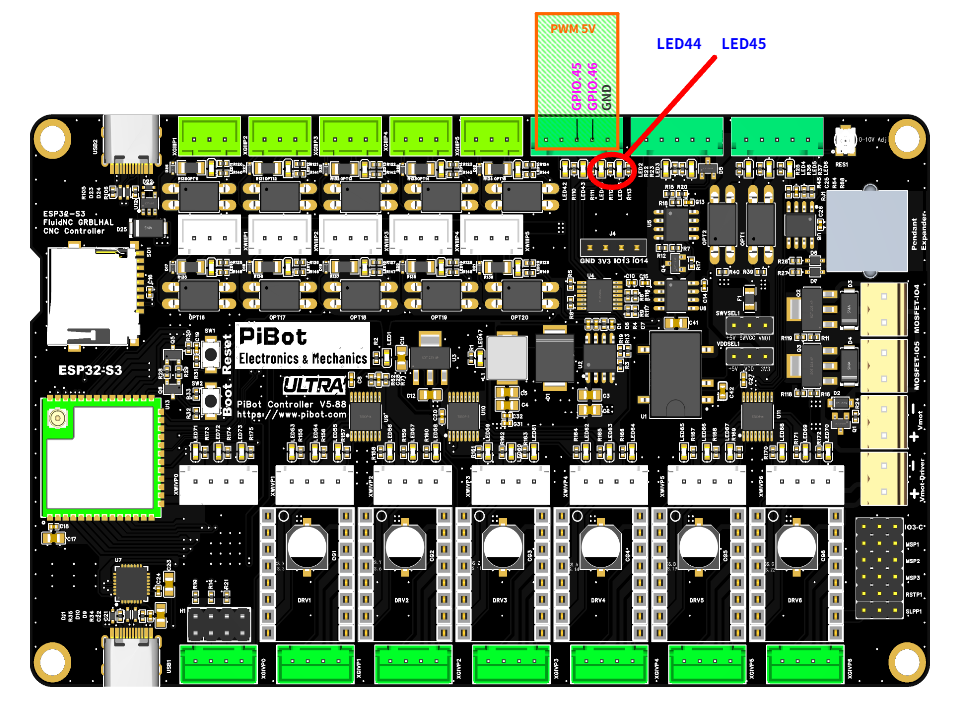
The PWM 5V header — GPIO.45 (PWM), GPIO.46 (Laser), GND — with indicators LED44 and LED45.
- GPIO.45 → driver PWM / speed input, GND → driver signal ground.
- 5 kHz PWM. Check with a multimeter first:
S10000≈ 5 V,S5000≈ 2.5 V,M5= 0 V.
pwm:
  pwm_hz: 5000
  output_pin: gpio.45
  enable_pin: NO_PIN
  disable_with_s0: false
  s0_with_disable: true
  tool_num: 0
  speed_map: 0=0.000% 10000=100.000%
  off_on_alarm: false
B
Laser — M6 T1

Figure B1 — a laser module has three leads. PWM/TTL+ and GND go to the PWM 5V header; 12V+/VCC comes from the module's own supply and never touches the controller — but that supply's negative must sit on the same ground as the controller, or the TTL signal has no return path. The test YAML puts the laser on GPIO.46 — GPIO.45 serves equally well as long as the YAML names the pin you actually wired. Click the image to view it full size.
- GPIO.46 → laser module TTL / PWM input, GND → its signal ground (same header as above).
- Scale is 0–255, not 0–10000 — full power is
S255. - The laser only fires while moving. Set power with
M3 S255, then send a move such asG1 F1000.
| Mode | Behaviour | Typical use |
|---|---|---|
M3 | Constant power. Stays at the full S value whenever a feed move is active, including a dwell. Turn it off with M5, G0 or S0. | Cutting through material |
M4 | Dynamic power. Scales with feed rate during acceleration and deceleration so corners do not burn darker, and stays off when there is no motion. | Engraving |
- A laser fires only in
G1,G2andG3moves — never duringG0, jogging or homing. If you need output in those modes, use apwmsection instead ofLaser. - Keep
off_on_alarm: trueso a triggered alarm cannot leave the laser burning. - The last entry of
speed_mapis the maximumSyour CAM software should emit —255here.
Laser:
  pwm_hz: 5000
  output_pin: gpio.46
  enable_pin: NO_PIN
  disable_with_s0: false
  s0_with_disable: true
  tool_num: 1
  speed_map: 0=0.000% 255=100.000%
  off_on_alarm: true
Verify with a multimeter before connecting the laser, and wear goggles rated for its wavelength.
C
0–10 V VFD spindle — M6 T2
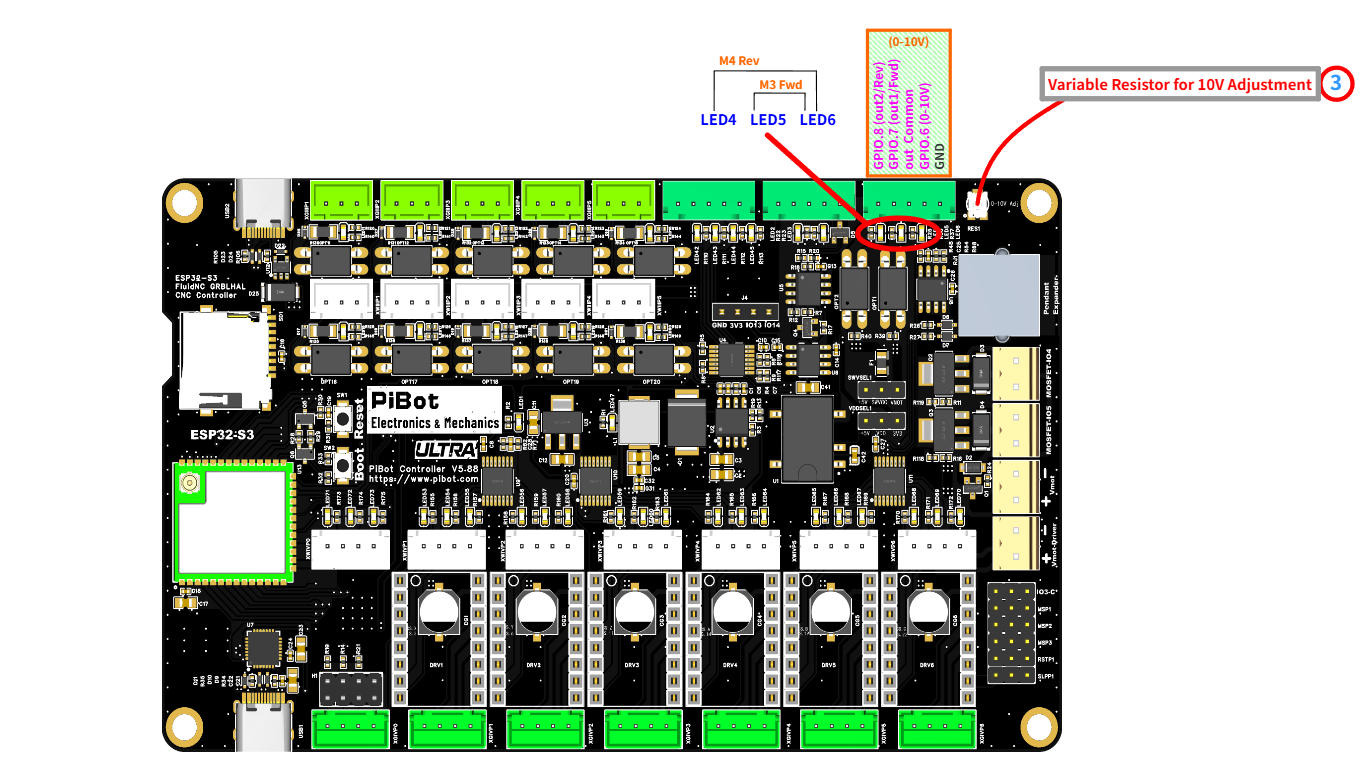
The 0–10V terminal — GPIO.8 (out2/Rev), GPIO.7 (out1/Fwd), out Common, GPIO.6 (0–10V), GND — with LED4 (M4 Rev), LED5 (M3 Fwd), LED6, and the 10 V adjustment trimmer (item ③).
Check what your drive's
+10V terminal actually is. On the drive in both drawings below it is the reference supply for a manual speed potentiometer, not an input — which is why the figures mark it with a red ×. The V5.88 generates its own 0–10 V, so nothing goes there. Terminal names are not standardised, though — on another brand a terminal printed 10V may be the analog input itself. Identify the analog voltage input in your own manual (it carries a name such as VI, AVI or AI), then take GPIO.6 to it and GND to the analog common (GND / ACM).C1
Five wires — direction straight from the optocoupler outputs
Figure C1 — the basic connection: three digital wires (X1, X2, COM) and two analog wires (VI, GND). X3 stays empty here — see C2 if your drive needs it. Terminal names and the pushbutton station differ between brands; this drive is one example. Click the image to view it full size.
| V5.88 terminal | → VFD terminal | Function |
|---|---|---|
| GPIO.6 (0–10V) | analog voltage input (VI / AVI / AI) | speed reference |
| GND | analog common (GND / ACM) | analog return |
| GPIO.7 (out1/Fwd) | forward digital input (X1 / DI1) | run forward |
| GPIO.8 (out2/Rev) | reverse digital input (X2 / DI2) | run reverse |
| out Common | digital common (COM / DCM) | shared return for Fwd and Rev |
out Commonis not a ground. GPIO.7 with out Common, and GPIO.8 with out Common, are the two ends of an optocoupler — think of each pair as a switch. Its common end belongs on the drive's digital common (COM / DCM). The separate GND pin on the same terminal block is the return for the 0–10 V signal only, and the two are wired to different places on the drive.- The two channels share one common — they are a pair of switches with a common pole, not two independent floating contacts, so both must return to the same drive terminal.
- The optocoupler output passes no voltage of its own to the drive; it only completes the drive's own input circuit. It does conduct in one direction only — see C2 if your drive uses source-type (PNP) inputs.
- Set the drive to take its run command from the terminals and its speed reference from the analog input, not from the keypad. Parameter numbers differ by brand — look them up in the drive's own manual.
- The 0–10 V output is factory-calibrated to 10 V — only touch the trimmer if your drive needs a different full scale, and watch a multimeter while you do.
- What the G-code does:
M3 S12000closes Fwd and sets the analog voltage;M4releases Fwd and closes Rev;M5releases both contacts and, withs0_with_disable: true, drops the analog output to theS0value at the same time.
💡 This page uses the
10V spindle type rather than plain PWM because 10V has separate forward_pin and reverse_pin and releases them on M5. A drive that holds a minimum frequency at 0 V would keep turning if its direction input stayed closed.💡 A concrete example. On a Huanyang drive,
PD001 = 1 takes the run command from the external terminals and PD002 = 1 takes the frequency from the external analog input. Other brands use different numbers for the same two choices — find them in your own manual.10V: forward_pin: gpio.7 # out1/Fwd - X1 reverse_pin: gpio.8 # out2/Rev - X2 output_pin: gpio.6 # 0-10V - VI, GND - analog common enable_pin: NO_PIN # no enable contact in Figure C1 direction_pin: NO_PIN pwm_hz: 5000 disable_with_s0: false s0_with_disable: true spinup_ms: 0 spindown_ms: 0 tool_num: 2 speed_map: 0=0.000% 1000=0.000% 24000=100.000% off_on_alarm: false
C2
When the drive needs a maintained start or enable contact- The drive is set for three-wire control, where the STOP input must be held closed before it will start at all.
- A multi-function input is assigned to run-enable or external stop and has to be closed.
- The drive's digital inputs are source (PNP) type. An optocoupler output conducts in one direction only; a relay contact has no polarity and works either way.
- You need contacts with independent commons — the two optocoupler channels share one.

Figure C2 — three relay contacts do forward, reverse and start/stop. The 0–10 V pair is wired exactly as in C1; only the digital side changes. The relay board is a PiBot IsoSwitch V4, driven from I2SO.23 / I2SO.21 / I2SO.20 plus GND. Click the image to view it full size.
| Relay | Input | V5.88 signal | → VFD terminal | YAML key |
|---|---|---|---|---|
| K3 | S3 | I2SO.20 | X1 (FWD) | forward_pin |
| K2 | S2 | I2SO.21 | X2 (REV) | reverse_pin |
| K1 | S1 | I2SO.23 | X3 (STOP / enable) | enable_pin |
- The three COM terminals are separate. The board does not join them internally — the drawing bridges them with a short external link so all three contacts return to the drive's COM.
- Each channel is a NC / COM / NO changeover contact. These connections use COM–NO, so a de-energised board leaves the drive stopped.
- The IsoSwitch V4 runs from its own 4.5–40 V DC supply (24 V by default), takes 5 V or 3.3 V logic on S1 / S2 / S3, and its INPUT GND must be tied to the V5.88 GND. Trigger jumpers JP4→S1, JP5→S2, JP6→S3 — full detail in 4.3 Connect External Relay and the IsoSwitch V4 reference.
- I2SO.23 / I2SO.21 / I2SO.20 are the C-axis EN/STP/DIR signals in the test YAML — use them only when that axis is unused. Any spare output works; the pin names live in your YAML, not in the hardware.
- You can mix the two drawings. Keep Fwd and Rev on the optocouplers as in C1 and spend a single relay on the enable contact — then
forward_pin: gpio.7,reverse_pin: gpio.8,enable_pin: I2SO.23.
10V:
  forward_pin: I2SO.20         # K3 - X1 (FWD)
  reverse_pin: I2SO.21         # K2 - X2 (REV)
  enable_pin: I2SO.23          # K1 - X3 (STOP / enable)
  output_pin: gpio.6           # 0-10V - VI, GND - analog common
  direction_pin: NO_PIN
  pwm_hz: 5000
  disable_with_s0: false
  s0_with_disable: true
  spinup_ms: 0
  spindown_ms: 0
  tool_num: 2
  speed_map: 0=0.000% 1000=0.000% 24000=100.000%
  off_on_alarm: false
C3
Two-wire or three-wire — match the drive's own parameter| Terminal control mode set in the drive | What the drive expects | Wiring | YAML |
|---|---|---|---|
| Two-wire — X1 = run forward, X2 = run reverse | a closure held for as long as it should run | Figure C1 | forward_pin + reverse_pin, enable_pin: NO_PIN |
| Two-wire — X1 = run, X2 = direction | one held run contact plus one direction contact | one contact on each input | enable_pin (run) + direction_pin (direction) |
| Three-wire — X1 / X2 = start, X3 = stop | a start command plus a stop input held closed | Figure C2 | enable_pin on the X3 contact — M5 stops the drive by releasing it |
- FluidNC drives levels, never pulses. A contact closes on
M3/M4and opens onM5— which is exactly what two-wire control expects, so start there if your drive offers it. - Three-wire needs the enable contact. Releasing the start input does not stop a latched drive; only opening its STOP input does, and that is the contact
enable_pinholds.
💡 FluidNC writes the direction contacts first and the enable contact last. A three-wire drive that latches on the rising edge of its start input can therefore miss the command. Prove your combination either way: send
M3 S12000 and M5 ten times in a row and confirm every start and every stop. If a three-wire drive is unreliable, switch it to two-wire control.Do not leave a manual pushbutton station wired across the same terminals. A controller contact in parallel with the panel's stop button bypasses that button. And the drive's STOP input is not a safety stop in any wiring: an emergency stop must remove power through a rated safety circuit, not through a terminal command.
D
RS485 Modbus VFD — M6 T3
- A → VFD A, B → VFD B. Two wires only. If it does not communicate, swap A and B.
- The RS485 interface is galvanically isolated. Internally it is UART1 — TX GPIO.12, RX GPIO.11.
- Match baud and format at both ends, and set the VFD's
modbus_idto match.
uart1:
  txd_pin: gpio.12
  rxd_pin: gpio.11
  rts_pin: NO_PIN
  baud: 9600
  mode: 8N1

ModbusVFD:
  uart_num: 1
  modbus_id: 1
  poll_ms: 250
  retries: 5
  spinup_ms: 6000
  spindown_ms: 6000
  tool_num: 3
  speed_map: 0=0.00% 24000=100.00%
  off_on_alarm: false

No VFD on the bench? A USB-to-RS485 adapter plus the PiBot VFD simulator proves the RS485 side works first.
💡
ModbusVFD in the test configuration is a generic profile. FluidNC also ships named profiles for specific drives (Huanyang, H2A, YL620, NowForever…) — see the FluidNC wiki for the exact spindle section your VFD needs.E
On/off spindle through a relay — Relay
- For a router or motor with no speed input at all. Any
Svalue above 0 turns the output fully on;M5turns it off. - Never drive a relay with a PWM signal — the coil chatters and the contacts fail. That is exactly what this type avoids.
- Two ways to wire it on the V5.88:
- MOSFET channel GPIO.4 or GPIO.5 — 500 mA each with an on-board flyback diode, enough for a DC relay coil or contactor coil of that size. They are
M7/M8coolant in the test YAML, so free the one you take. - A relay module such as the PiBot IsoSwitch V4, fed from a spare 5 V, I2SO or Extra-GPIO output — see 4.3 Connect External Relay.
- MOSFET channel GPIO.4 or GPIO.5 — 500 mA each with an on-board flyback diode, enough for a DC relay coil or contactor coil of that size. They are
- Mains switching stays on the contact side, in a rated enclosure, with the contact chosen so that a power loss leaves the spindle off.
- Give
spinup_msa real value — a router started this way needs seconds to reach speed, and FluidNC will hold the next move for that long.
Relay:
  output_pin: gpio.4           # MOSFET channel, or any spare output driving a relay module
  enable_pin: NO_PIN
  direction_pin: NO_PIN
  disable_with_s0: false
  s0_with_disable: true
  spinup_ms: 3000              # let the spindle reach speed before cutting
  spindown_ms: 3000
  tool_num: 4
  off_on_alarm: true
F
Brushless ESC or RC servo — BESC
- For a brushless motor driven through an ESC (the drone/RC kind, used as a light high-speed spindle), or for a hobby servo such as a pen lift.
- The signal is RC-style: a pulse of roughly 1–2 ms inside a 20 ms period, so
pwm_hz: 50.min_pulse_usandmax_pulse_uscome from your ESC's own documentation, andspeed_mapis then a plain percentage of that span — no duty-cycle arithmetic. - It needs a raw PWM pin: GPIO.45 or GPIO.46 on the 5 V header. Do not use the 0–10 V terminal — that output is a filtered analog voltage, not a pulse train.
- Three wires: signal, ground and power. The signal goes to GPIO.45 or GPIO.46, the ground to that header's GND, and the power to a 5 V source — the board's +5V pin for a small servo, or its own supply for an ESC and motor.
- An ESC that expects an arming sequence at power-up can be walked through it from G-code —
M3 S0for minimum throttle,M3 S1000for full,M3 S500for mid. - The same section drives a pen-lift servo:
M3 S1000down,M5up. FluidNC also has an RC servo axis feature if you want it on an axis instead.

Figure F1 — the wiring path for a 5 V hobby servo: signal (white) to a PWM pin on the PWM 5V header, black to that header's GND, and red to the +5V pin on the RS485 terminal block. The servo in the photograph is there to show the three leads, not as a recommended size — see the note below. Click the image to view it full size.
Watch the servo's current. A servo draws far more while it moves — and more again if it stalls — than while it sits still. That +5V pin is the board's own regulated rail, produced by the on-board step-down converter from the 12–24 V input — so it shares its budget with the rest of the board. Treat it as a supply for a light servo — a pen lift, a tool-cover flap. Anything with real torque, including the class of servo in the photograph, and any ESC-driven motor, needs its own 5 V supply, with only the ground shared with the controller.
BESC:
  output_pin: gpio.45          # raw PWM pin - not the 0-10V terminal
  pwm_hz: 50                   # 20 ms period
  min_pulse_us: 1000           # ESC "off" pulse - check its datasheet
  max_pulse_us: 2000           # ESC full-power pulse
  tool_num: 5
  speed_map: 0=0% 1000=100%
G
DC motor through an H-bridge — HBridge
- Like a PWM spindle, but with one PWM output per direction. While one is toggling the other is held low, and
M5turns both off. - GPIO.45 and GPIO.46 are the two buffered 5 V PWM outputs — the natural pair for
output_cw_pinandoutput_ccw_pin. They drive the inputs of an H-bridge module, which needs its own supply. - The MOSFET channels cannot do this. They are low-side switches: they can turn a DC load on and off, but they cannot reverse it.
- There is no
direction_pinin this section — the two output pins carry the direction.
HBridge:
  pwm_hz: 5000
  output_cw_pin: gpio.45
  output_ccw_pin: gpio.46
  enable_pin: NO_PIN
  disable_with_s0: false
  spinup_ms: 1000
  spindown_ms: 1000
  tool_num: 6
  speed_map: 0=0.000% 10000=100.000%
  off_on_alarm: false
H
Plasma torch — Plasma
- This section has no speed output.
enable_pinfires the torch, andarc_ok_pinis an input that confirms the arc transferred. - If
arc_ok_pingoes inactive while cutting, motion is aborted with an alarm.arc_wait_msis how long FluidNC waits for the confirmation before giving up. - On the V5.88: fire the torch through a relay contact (E), and take arc OK into one of the ten optocoupler-isolated inputs you are not using for limits. Add
:lowif the signal is active-low. - Plasma is a development feature in FluidNC — read its own plasma page for the hardware notes before wiring a torch.
Plasma:
  enable_pin: I2SO.23          # torch start, through a relay contact
  arc_ok_pin: gpio.36:low      # a free optocoupler input
  arc_wait_ms: 1000
  tool_num: 7
  off_on_alarm: true
I
Settings every spindle section shares
| Setting | What it does | Notes |
|---|---|---|
tool_num | Where this spindle's tool range starts | The range runs until the next spindle's tool_num. One spindle must have tool_num: 0 so every tool number is valid. |
speed_map | Maps the S value to the output | 0=0.000% 1000=0.000% 24000=100.000% means S below 1000 gives nothing — a minimum-speed floor. Full syntax on FluidNC's speed map page. |
enable_pin | A separate line held on while the spindle runs | The start / enable contact in C2. Affected by disable_with_s0. |
direction_pin | Reverse signal | M4 is only accepted when this — or forward_pin/reverse_pin in a 10V section — is assigned. |
spinup_ms / spindown_ms | Wait after a speed change before the next move runs | 0–60000 ms, scaled to the size of the change: half the range costs half the time. |
disable_with_s0 | Also disable at S0, not only at M5 | Default false. |
s0_with_disable | Drive the speed output to its S0 value on M5 | Leave true so the analog or PWM output actually falls to zero when you stop. |
off_on_alarm | Turn the spindle off when an alarm occurs | Recommended true for a laser, and worth it for a torch. |
atc / m6_macro | Automatic tool change, or a macro to run instead of the built-in M6 | Optional — see the FluidNC spindle configuration page. |
J
Using more than one spindle
- Define as many as your hardware supports. Each is its own section and they act independently — a machine can carry a router, a laser and a VFD at once.
- Every spindle needs its own pins. The config parser rejects a pin used twice, and FluidNC has to be able to control each spindle separately during tool changes and alarms.
- Tool numbers decide which spindle is active.
tool_numis the first tool of that spindle's range, and the range runs until the next spindle'stool_num. One of them must be0so every tool number is valid. Break the rule and FluidNC warns, then hands out temporary ranges of 100 in config-file order. - Keep
TandM6on the same line, the way the bench pages writeM6 T2. ATon its own only sets the next tool; the change happens onM6. Send$Gto read back the current tool and modal state. - Send
M5before switching, so the previous output is left at zero. WhenM6selects a tool inside the current spindle's own range, theSvalue is reset to 0. - Use shielded cable for the analog and RS485 runs, and keep them away from motor and limit-switch wiring. A VFD is the noisiest device on the machine.
💡 The four paths in the test YAML (
M6 T0 PWM, T1 laser, T2 0–10 V, T3 RS485) already follow these rules, which is why they can all be wired at the same time. Sections E–H above use tool numbers 4–7 so you can add one without disturbing them.Quick troubleshooting
- Laser voltage is right but it never fires. Expected — send a
G1 F1000move after setting the power. - Laser always at full power. Its scale is 0–255; an
S10000clamps to maximum. - VFD ignores the speed signal. It is still set to keypad reference — change its source parameters.
- RS485 silent. Swap A and B, then check baud, format and
modbus_id. - Direction inverted. Swap the wires on the VFD's forward and reverse inputs.
- The spindle keeps turning after
M5. A three-wire drive stays latched until its STOP input opens — wire that contact as in C2 and assign it toenable_pin. - The drive runs from its own panel but not from
M3. Its digital inputs may be source (PNP) type — the optocoupler outputs conduct in one direction only. Use a relay contact (C2) instead, and check that out Common went to the digital common (COM / DCM), not to the analog GND. - Nothing on any output. Select the tool first with M6.
- A spindle you just added does nothing. Check the tool numbers: one section must have
tool_num: 0, the ranges must not overlap, andM6has to select this one. - An ESC beeps and never spins. It has not been armed — walk it through its throttle sequence with
M3 S0/M3 S1000, and checkmin_pulse_us/max_pulse_usagainst its datasheet. - A relay chatters or dies. It is being fed a PWM signal — use a
Relaysection, notpwm.
pibot_cnc_laser_series/v588_ultra/connect_spindles/start.txt · Last modified: by 127.0.0.1