
4.3 Connect External Relay
Wiring a PiBot IsoSwitch V4
The PiBot IsoSwitch V4 gives three relay channels, each with an NC / COM / NO changeover contact and an optocoupler input stage. It runs from its own 4.5–40 V DC supply (24 V by default) and takes three logic signals on S1 S2 S3, at either 5 V or 3.3 V. Of the four controllers documented here, V5.88 Ultra is the only one that exposes all three signal routes.
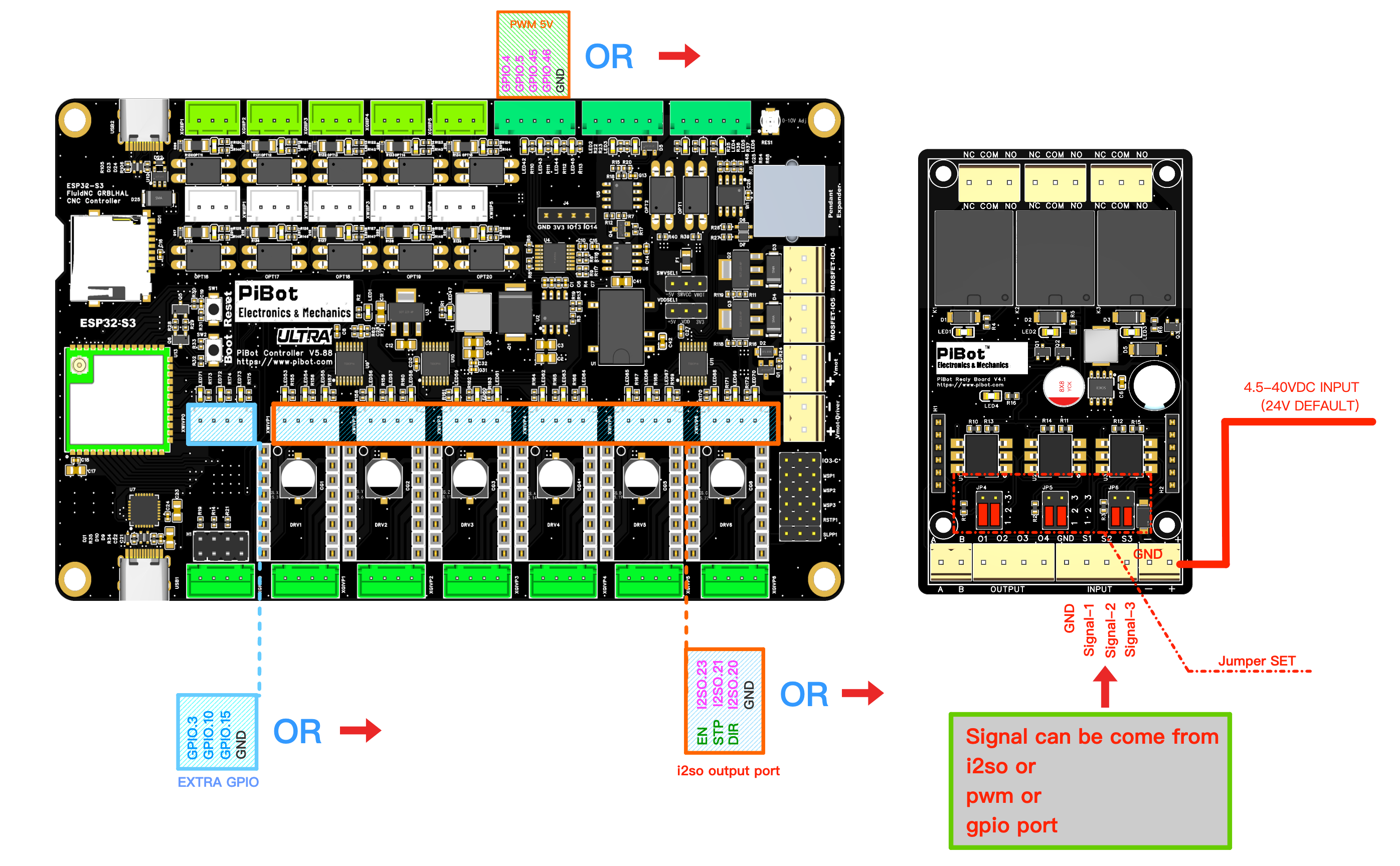
Which outputs you can use on V5.88 Ultra
| Route | Pins | Level | Notes |
|---|---|---|---|
| 5 V buffered output header (labelled PWM 5V) | GPIO.4 GPIO.5 GPIO.45 GPIO.46 + GND | 5 V signal | GPIO.4/GPIO.5 also drive the MOSFET channels; GPIO.45/GPIO.46 are spindle and laser PWM in the test YAML. This header supplies control signals, not relay-coil power. |
| I2SO output | I2SO.23 I2SO.21 I2SO.20 + GND | 5 V signal | The C-axis EN/STP/DIR/GND terminal in the test YAML; use it only when that axis is unused. |
| EXTRA GPIO | GPIO.3 GPIO.10 GPIO.15 + GND | 3.3 V signal | Accepted by this relay board. Set the GPIO.3 function jumper to output and remove its toolsetter assignment before using GPIO.3 here. |
Trigger jumpers on the relay board
Each relay has its own jumper block — JP4→S1, JP5→S2, JP6→S3. The silkscreen numbers the rows 1 (bottom), 2 (middle), 3 (top); each column takes one jumper, down bridging 1–2 and up bridging 2–3.
| Setting | Left column | Right column | Effect |
|---|---|---|---|
| Active High — default | down (1–2) | down (1–2) | A high signal energises the relay. |
| Active Low | up (2–3) | up (2–3) | A low signal energises the relay. |
| Always on | up (2–3) | down (1–2) | Stays energised, input ignored. |
| Always off | down (1–2) | up (2–3) | Stays de-energised, input ignored. |
Wire and prove the control side first
- Disconnect the V5.88 and relay-board supplies.
- Choose one route from the table; do not combine the 5 V, I2SO and Extra-GPIO routes.
- Wire three signals and GND to S1/S2/S3/GND, then power the relay board from its own supply.
- If GPIO.3 is used, set its function jumper to output and remove the toolsetter assignment.
- Set JP4/JP5/JP6 and load the matching YAML.
- With no load attached, send one command at a time, watch the LED and verify both contact paths with a continuity meter.
YAML and test commands
Matching the drawing, where I2SO.23→S1, I2SO.21→S2 and I2SO.20→S3. Substitute your own pins if you wired a different output.
coolant:
  mist_pin: I2SO.23        # S1 - M7 on, M9 off
  flood_pin: I2SO.21       # S2 - M8 on, M9 off
  delay_ms: 0

user_outputs:
  digital0_pin: I2SO.20    # S3 - M64 P0 on, M65 P0 off
Pass: each command changes only its assigned relay and the continuity reading agrees with the selected contact. Fail: a relay starts unsafe, more than one changes, or a command does not release it — disconnect both supplies and correct the YAML, jumpers or contact wiring before adding a load.
Being free to assign a pin is not the same as that pin being able to power something. V5.88 outputs fall into two electrical classes, and picking the wrong one is how outputs get damaged.
| Output | Driven by | Capability | Can drive directly |
|---|---|---|---|
| MOSFET channel io.4-MOS-GND io.5-MOS-GND | NCE6005AR MOSFET, low-side | Switches real load current on the Vmot-Main rail — 500 mA max, on-board flyback diode | a bare relay coil, solenoid valve, small fan or lamp |
| 5 V outputs GPIO.4 GPIO.5 GPIO.45 GPIO.46 | 74AHCT125 logic buffer | Signal only — milliamp-class 5 V logic | the input of a relay module or SSR that has its own supply |
| I2SO outputs e.g. I2SO.23 I2SO.21 I2SO.20 | 74AHCT595 shift registers | Signal only — milliamp-class 5 V logic | the input of a relay module or SSR |
| Plain GPIO e.g. GPIO.10 GPIO.15 | ESP32-S3 pin | Signal only — 3.3 V logic, very limited current | a relay module whose input accepts 3.3 V |
Solenoid valves, small fans, LED work lights and similar, running from the same voltage as Vmot-Main and drawing under 500 mA.
- Wire the load's + to Vmot-Main and its − to io.4-MOS-GND (or
io.5). - Check the load draws under 500 mA at your Vmot-Main voltage. If it does not, use section B instead.
- Test with
M7/M8to switch on andM9to switch both off. - The board includes flyback protection for correctly polarised inductive loads; verify polarity and the load data before power-on.
Dust extraction, a vacuum, a coolant pump, mains lighting — anything over 500 mA or running on mains. The MOSFET channel switches the relay's coil, and the relay switches the load.
- Choose a relay or SSR whose coil / control input matches your Vmot-Main voltage (commonly 12 V or 24 V DC) and whose contacts are rated for the real load.
- Wire the coil between Vmot-Main and io.4-MOS-GND, exactly like the DC load above, only after confirming its steady-state and inrush current stay below 500 mA.
- Wire the load through the relay's NO contacts, so a power loss leaves the load off.
- Switch with
M7/M8/M9as before.
A relay or SSR module has its own transistor and supply and only needs a control signal. That signal can come from any spare output — the choice is yours, and it lives in the YAML.
- Pick a free output. A 5 V output, an unused axis's EN/STP/DIR terminal, or an EXTRA IO pin all work.
- Check the module's input voltage. 5 V outputs and I2SO outputs give 5 V logic; plain GPIO gives 3.3 V. Many modules accept both, but confirm before wiring.
- Share a ground between the board and the module.
- Declare it in your YAML and drive it from G-code. In the PiBot test YAML the two EXTRA IO pins are set up as user outputs:
M64 P0   ; GPIO.10 on
M65 P0   ; GPIO.10 off
M64 P1   ; GPIO.15 on
M65 P1   ; GPIO.15 off
P0 / P1 numbers come from the test YAML — they are an example. Assign whichever pins your machine needs, in whatever order suits it.Quick troubleshooting
- Nothing switches. Confirm Vmot-Main is powered — USB alone does not feed it — and that you wired the load to MOS-GND, not to a board GND pin.
- The load is always on. It is probably wired between Vmot-Main and a plain GND, bypassing the MOSFET entirely.
- The MOSFET got hot or stopped working. The load exceeded 500 mA. Move it behind a relay or SSR.
- A relay chatters. Its coil voltage does not match Vmot-Main, or the coil current is too high for the channel.
- M64 / M65 do nothing. Confirm the pins are declared as user outputs in your YAML, and that GPIO.3's function jumper matches the role you want.