
SPI Adapter for A4988 Socket
This small adapter lets a compatible PiBot StepStick/A4988 socket route SPI to an external PiBot SilentStep TMC5160 V5 driver in SPI Independent mode.

Section 1Purpose and compatibility
What it routes
SPI Independent mode gives every external TMC5160 its own chip-select line. This adapter occupies a compatible A4988/StepStick socket and routes that socket's SPI signals and per-axis CS to the external driver connection.
What it does not do
It is not a stepper driver, a motor-output board or a power converter. It does not add a documented SPI-driver interface to V5.77 Carrier or V4.7B.
Use it for
Use the adapter in the selected onboard StepStick socket.
Follow the V4.96 slot-jumper settings shown in the driver guide.
You do not need it for
Current and microstepping come from the driver's own DIP switch.
The chain uses a single chip-select line, so no socket breakout is required.
Those configurations documented on this Wiki do not use this adapter.
Section 2How do I use it?
V5.88 Ultra
V4.96 Pro
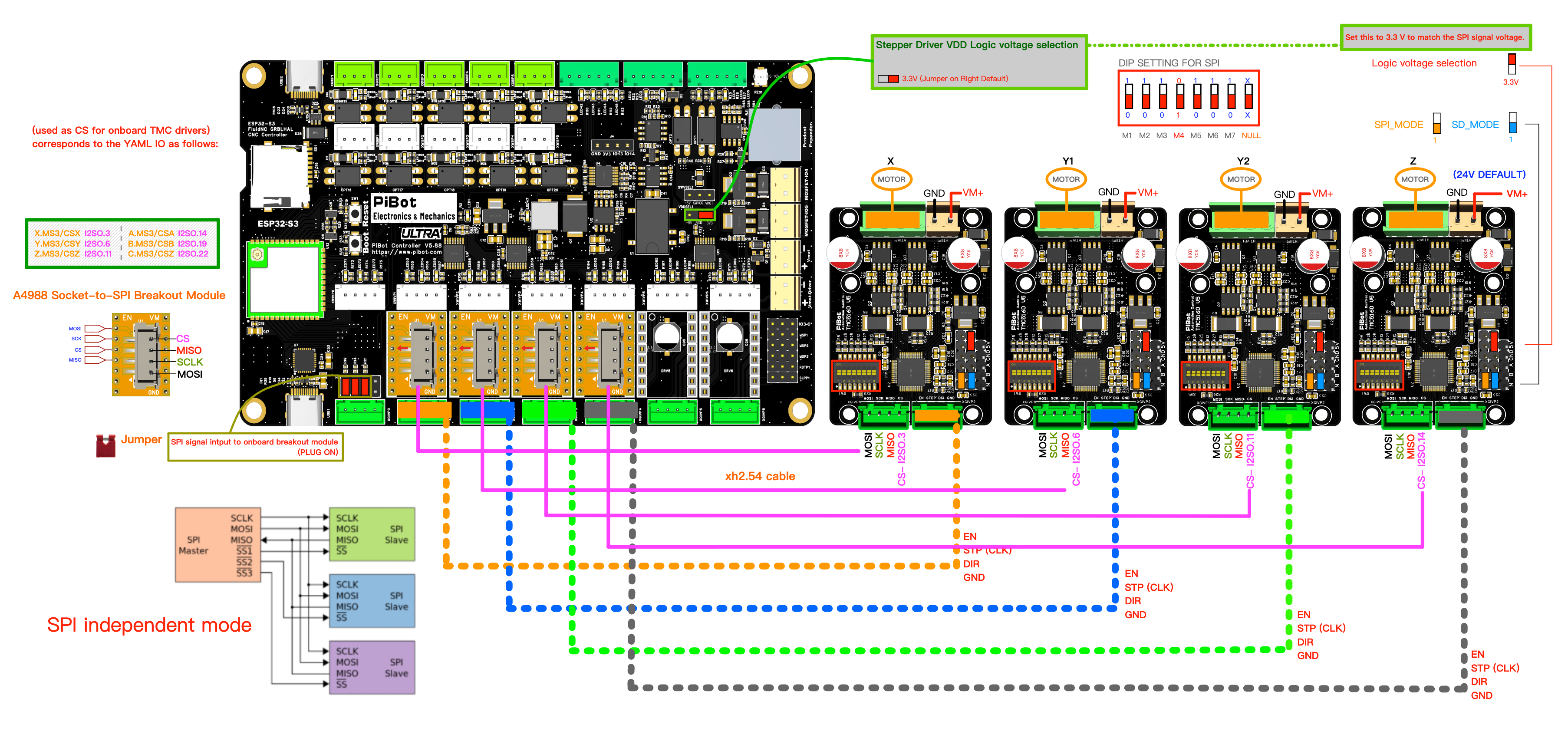
The yellow adapter in the photograph is the same accessory shown as the socket-to-SPI module in this connection method.
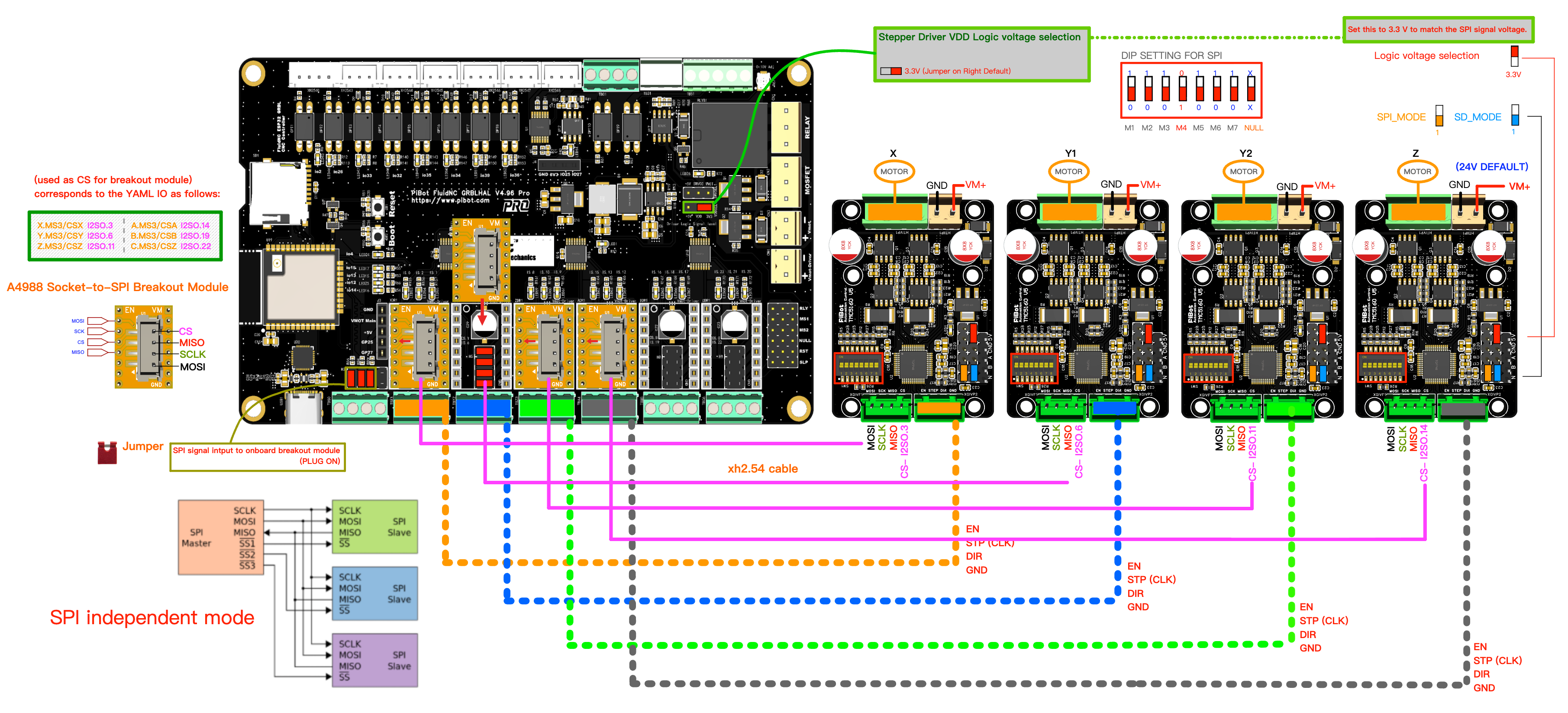
Use the V4.96 slot jumpers exactly as shown in the full driver connection guide.
cs_pin on every axis together with spi_index: -1, instead of the single cs_pin and counting spi_index used by a daisy chain.Section 3FluidNC YAML for Independent mode
Independent mode gives every TMC5160 its own cs_pin. Each driver uses spi_index: -1; do not copy the numbered spi_index used by a daisy chain.
tmc_5160:
  cs_pin: I2SO.3       # example: first connector only
  spi_index: -1        # independent SPI mode
  r_sense_ohms: 0.1
  run_amps: 1.2
  hold_amps: 0.5
  microsteps: 16
  step_pin: I2SO.2
  direction_pin: I2SO.1
disable_pin: I2SO.0Section 4First-power and communication check
Before applying power
Communication test
$MI.Pass
$MI lists every expected driver with sensible status values. Power down, connect the secured machine, then perform a slow test jog.
Fail — stop here
If a driver is missing or reports an abnormal status, do not jog. Remove power and check the items in section 5.
Section 5Troubleshooting
Driver not detected
- Check the adapter is in the intended socket and is not rotated.
- Check 3.3 V logic selection on both controller and TMC5160 V5.
- Confirm every driver has a unique CS and
spi_index: -1. - Check MOSI, SCK, MISO, CS and GND continuity with power removed.
- Confirm the external TMC5160 has its required 24 V supply.
Detected, but motion is wrong
- Stop motion and check STEP, DIR and EN mapping against the controller table.
- Check motor coil order at the TMC5160 driver, not at the adapter.
- Confirm current and microsteps are appropriate for the motor.
- Do not change wiring or jumpers while powered.
Section 6Guides and downloads
Use the main TMC5160 V5 guide for the complete wiring, CS mapping, logic-voltage jumpers and controller-specific diagrams. Use the ready-made examples as a checked starting point, then adapt machine parameters deliberately.