2.2 Check Jumpers and Power On
Check List · Step 2 of 12 · Check the default jumpers, insert optional modules, then power on safely
▶️ Video Guide — 2.2 Check Jumpers and Power On
Use the video for orientation, then follow the numbered image and safety checks below before applying power.
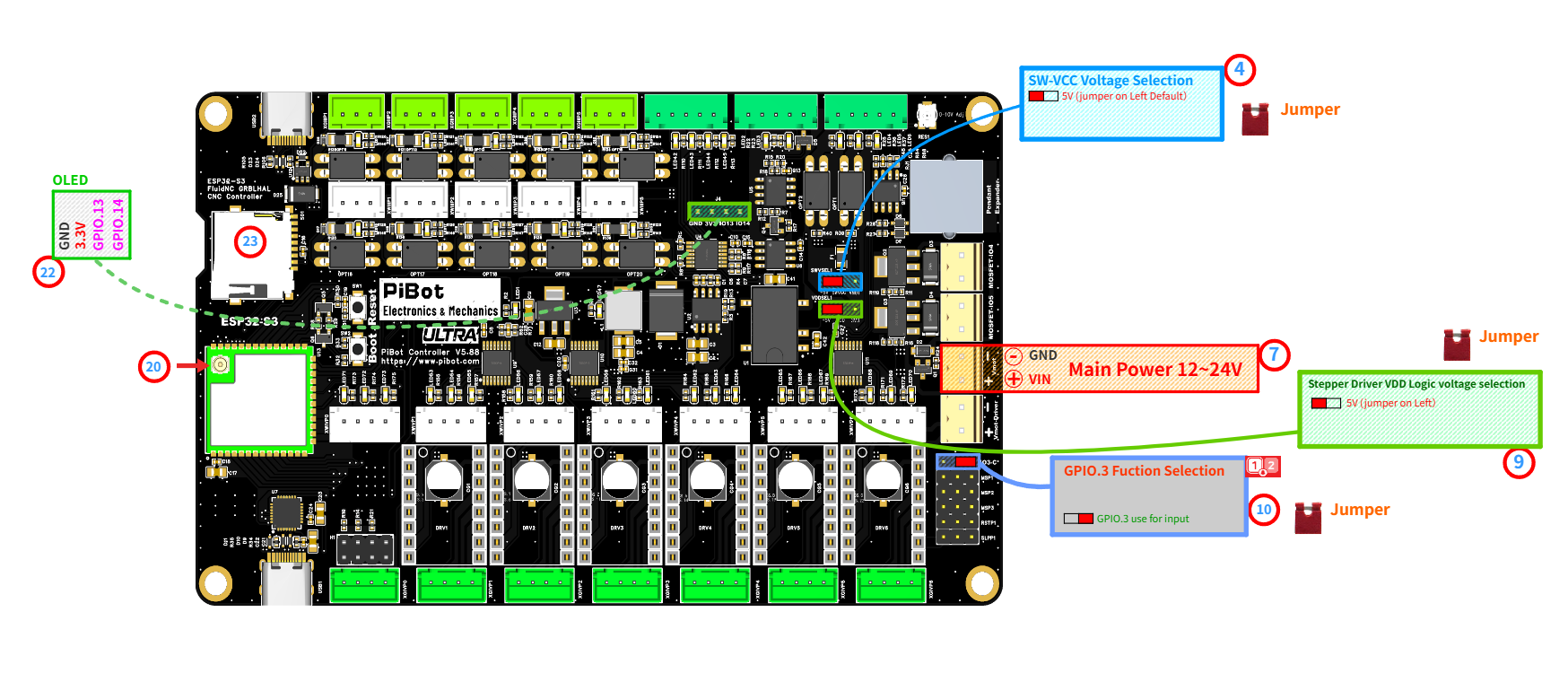
Use the red numbered marks in this image to find each connector, jumper, and module position.
⚠️
SAFETY FIRST: Please disconnect all external peripherals before starting the inspection process.
🎯 Objective
Before the first power-on, confirm that the factory default jumpers are installed in the correct positions. Then insert the antenna and optional modules, connect the main power input, and check the basic power-on result.
1
Initial Jumpers
💡 Only 3 jumper caps are installed by default from the factory.
- 4SW-VCC Voltage Selection: select 5V.
- 9Stepper Driver VDD Logic Voltage Selection: select 5V.
- 10GPIO.3 Function Selection: select GPIO.3 use for input.
2
Module Insert
- 20Insert the Antenna.
- 22Insert the OLED (optional).
- 23Insert the TF Card / microSD Card (optional).
3
Power On
- 7Connect 12V or 24V power to Main Power / Vmot-main.
- ⚠️ Do not reverse polarity.
- Default: 24V recommended.
- Switch on power.
✓
Expected Results
- The 5V power indicator LED should illuminate.
- 22The OLED screen should display information/data (if firmware installed).
⚠️
If the 5V LED does not turn on, switch off power immediately and re-check the input voltage, polarity, and jumper positions before continuing.